 This wiki does not contain official documentation and is currently deprecated and read only. Please try reading the documentation on the Liferay Developer Network, the new site dedicated to Liferay documentation. DISCOVER Build your web site, collaborate with your colleagues, manage your content, and more. DEVELOP Build applications that run inside Liferay, extend the features provided out of the box with Liferay's APIs. DISTRIBUTE Let the world know about your app by publishing it in Liferay's marketplace. PARTICIPATE Become a part of Liferay's community, meet other Liferay users, and get involved in the open source project.
 Optimal Liferay Core Development with JRebel
This page describes how to use JRebel to setup an optimal Liferay core development environment.
With this approach, the typical change/redeploy/test cycle of a Liferay Developer is simplified by eliminating the redeploy operation.
Table of Contents [-]
- Before you start
- Generate your rebel.xml file
- Install the JRebel Plugin for your IDE
- Deactivate unnecessary JRebel plugins
- Start Liferay Portal with JRebel agent
- Test JRebel fast hot deployment for Liferay classes and resources
- All other IDEs, or, from the command line
- JRebel and Liferay Plugins
- Known issues
- Optimize your development environment to the extreme
Before you start #
It is assumed that you have already installed a basic Liferay development environment as described in Getting started as a Liferay Developer in a few steps.
Generate your rebel.xml file #
In order to implement live deployment, JRebel installs a -javaagent that monitors the classes and resources in the workspace and propagates their changes to the running application. To define which resources from your workspace are to be monitored by JRebel, you have to add a rebel.xml file in your project.
To generate a default rebel.xml file in your portal classpath, just execute this ant task:
ant setup-jrebel
You will now find a default rebel.xml under your ${app.server.classes.portal.dir} (e.g. tomcat/webapps/ROOT/WEB-INF/classes) for portal classes and resources, and also under your ${app.server.lib.global.dir} (e.g. tomcat/lib/ext) for global classes.
Install the JRebel Plugin for your IDE #
Installing JRebel Plugin is pretty straightforward. Just follow the instructions for your preferred IDE.
If you don't have a JRebel license, you can get a fully featured 30-day trial:
JRebel plugin for IntelliJ #
JRebel for IntelliJ setup with Liferay Portal
JRebel plugin for Eclipse #
JRebel for Eclipse setup with Liferay Portal
Deactivate unnecessary JRebel plugins #
JRebel plugin includes several plugins itself design for specific frameworks and applications. Since we are focused on Liferay development, we will deactivate some of them to optimize JRebel performance. In your IDE, go to JRebel Plugin Preferences, launch the Agent Settings and select the Plugins tab. Then leave checked only those plugins shown in the following caps:
- Server Plugins
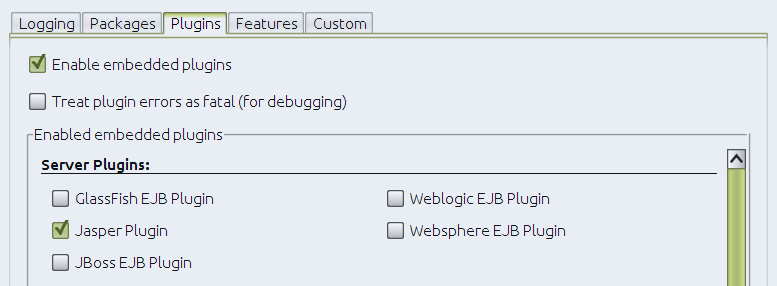
- Miscellaneous Plugins

Start Liferay Portal with JRebel agent #
Launch Tomcat using JRebel agent by selecting the corresponding option from your IDE. To make sure that JRebel is monitoring, check the logs of your app server. Interleaved with Tomcat and Liferay typical start-up messages, you should see these:
#############################################################
 JRebel <version>
 (c) Copyright ZeroTurnaround OU, Estonia, Tartu.
...
 The following plugins are disabled at the moment:
 <A list with the plugins you disabled before>
#############################################################
...
JRebel: Directory '${liferay-basedir}/osgi/bootstrap/classes' will be monitored for changes.
JRebel: Directory '${liferay-basedir}/portal-impl/classes' will be monitored for changes.
JRebel: Directory '${liferay-basedir}/portal-pacl/classes' will be monitored for changes.
JRebel: Directory '${liferay-basedir}/util-java/classes' will be monitored for changes.
JRebel: Directory '${liferay-basedir}/util-bridges/classes' will be monitored for changes.
JRebel: Directory '${liferay-basedir}/util-taglib/classes' will be monitored for changes.
JRebel: Directory '${liferay-basedir}/util-slf4j/classes' will be monitored for changes.
JRebel: Directory '${liferay-basedir}/portal-web/docroot' will be monitored for changes.
...
JRebel: Monitoring Spring bean definitions in '${liferay-basedir}/portal-impl/classes/META-INF/base-spring.xml'.
JRebel: Monitoring Spring bean definitions in '${liferay-basedir}/portal-impl/classes/META-INF/hibernate-spring.xml'.
JRebel: Monitoring Spring bean definitions in '${liferay-basedir}/portal-impl/classes/META-INF/infrastructure-spring.xml'.
JRebel: Monitoring Spring bean definitions in '${liferay-basedir}/portal-impl/classes/META-INF/management-spring.xml'.
JRebel: Monitoring Spring bean definitions in '${liferay-basedir}/portal-impl/classes/META-INF/util-spring.xml'.
JRebel: Monitoring Spring bean definitions in '${liferay-basedir}/portal-impl/classes/META-INF/executor-spring.xml'.
JRebel: Monitoring Spring bean definitions in '${liferay-basedir}/portal-impl/classes/META-INF/audit-spring.xml'.
JRebel: Monitoring Spring bean definitions in '${liferay-basedir}/portal-impl/classes/META-INF/cluster-spring.xml'.
JRebel: Monitoring Spring bean definitions in '${liferay-basedir}/portal-impl/classes/META-INF/editor-spring.xml'.
JRebel: Monitoring Spring bean definitions in '${liferay-basedir}/portal-impl/classes/META-INF/jcr-spring.xml'.
JRebel: Monitoring Spring bean definitions in '${liferay-basedir}/portal-impl/classes/META-INF/ldap-spring.xml'.
JRebel: Monitoring Spring bean definitions in '${liferay-basedir}/portal-impl/classes/META-INF/messaging-core-spring.xml'.
JRebel: Monitoring Spring bean definitions in '${liferay-basedir}/portal-impl/classes/META-INF/messaging-misc-spring.xml'.
JRebel: Monitoring Spring bean definitions in '${liferay-basedir}/portal-impl/classes/META-INF/mobile-device-spring.xml'.
JRebel: Monitoring Spring bean definitions in '${liferay-basedir}/portal-impl/classes/META-INF/notifications-spring.xml'.
JRebel: Monitoring Spring bean definitions in '${liferay-basedir}/portal-impl/classes/META-INF/poller-spring.xml'.
JRebel: Monitoring Spring bean definitions in '${liferay-basedir}/portal-impl/classes/META-INF/rules-spring.xml'.
JRebel: Monitoring Spring bean definitions in '${liferay-basedir}/portal-impl/classes/META-INF/scheduler-spring.xml'.
JRebel: Monitoring Spring bean definitions in '${liferay-basedir}/portal-impl/classes/META-INF/search-spring.xml'.
JRebel: Monitoring Spring bean definitions in '${liferay-basedir}/portal-impl/classes/META-INF/workflow-spring.xml'.
JRebel: Monitoring Spring bean definitions in '${liferay-basedir}/portal-impl/classes/META-INF/counter-spring.xml'.
JRebel: Monitoring Spring bean definitions in '${liferay-basedir}/portal-impl/classes/META-INF/mail-spring.xml'.
JRebel: Monitoring Spring bean definitions in '${liferay-basedir}/portal-impl/classes/META-INF/portal-spring.xml'.
JRebel: Monitoring Spring bean definitions in '${liferay-basedir}/portal-impl/classes/META-INF/portlet-container-spring.xml'.
JRebel: Monitoring Spring bean definitions in '${liferay-basedir}/portal-impl/classes/META-INF/staging-spring.xml'.
JRebel: Monitoring Spring bean definitions in '${liferay-basedir}/portal-impl/classes/META-INF/virtual-layouts-spring.xml'.
JRebel: Monitoring Spring bean definitions in '${liferay-basedir}/portal-impl/classes/META-INF/monitoring-spring.xml'.
JRebel: Monitoring Spring bean definitions in '${liferay-basedir}/portal-web/docroot/WEB-INF/remoting-servlet.xml'
...
Connected to server
Note: the ERROR messages at ClassPathUtil happen because some classes are now not loaded from WEB-INF/classes, but from our workspace. You can just ignore them.
Test JRebel fast hot deployment for Liferay classes and resources #
Now we are ready to test JRebel's magic.
In order to check that JRebel is working fine, we will perform a couple of tests:
Hot deploying changes on Liferay classes #
For this test we will make some changes at the service method of the MainServlet.java class, which is executed everytime we load a page of the portal. Let's simply add the following line at the very top of the method body:
System.out.println("Bye bye, redeploying");Then compile your class. Nothing special happens (so far). Now navigate the portal (any page will do) and check Tomcat's logs. You should see:
JRebel: Reloading class MainServlet.java
Bye bye, redeploying
This means that it worked (great) and that JRebel reloads the class modified at the developer workspace only when it is requested.
Hot deploying changes on Liferay resources #
For this test we will make some changes at the login portlet. First navigate a page of the portal with the login portal. Now in your IDE open the /porta/portal-web/docroot/html/portlet/login/login.jsp file, write some HTML text right below the init.jsp include and save your changes. Now reload the page at your browser. You should see the text at the top of the portlet body.
All other IDEs, or, from the command line #
You can find more information in this blog by Neil Griffin:
JRebel and Liferay Plugins #
The default integration with JRebel described above is not limited to Liferay Portal only, but it also covers Liferay plugins. When your Liferay plugin is deployed in your server, you will notice new JRebel log messages indicating which classes and resources from the plugin will be monitored by JRebel.
Known issues #
In some cases (at least in UBUNTU systems) you could suffer at this point an error related with the maximum number of files opened. It has an easy solution:
Edit /etc/security/limits.conf including:
*   soft nofile 50000
*   hard nofile 50000
Then reboot and relaunch Tomcat.
Optimize your development environment to the extreme #
So far you have installed and configured an optimal Liferay development environment based on JRebel. But you can work even more efficiently with just a few extra steps:
